
Amilia SmartRec
Register for Open Play Pickleball
Reserving Open Play Pickleball via the Amilia App
Available on iOS & Android
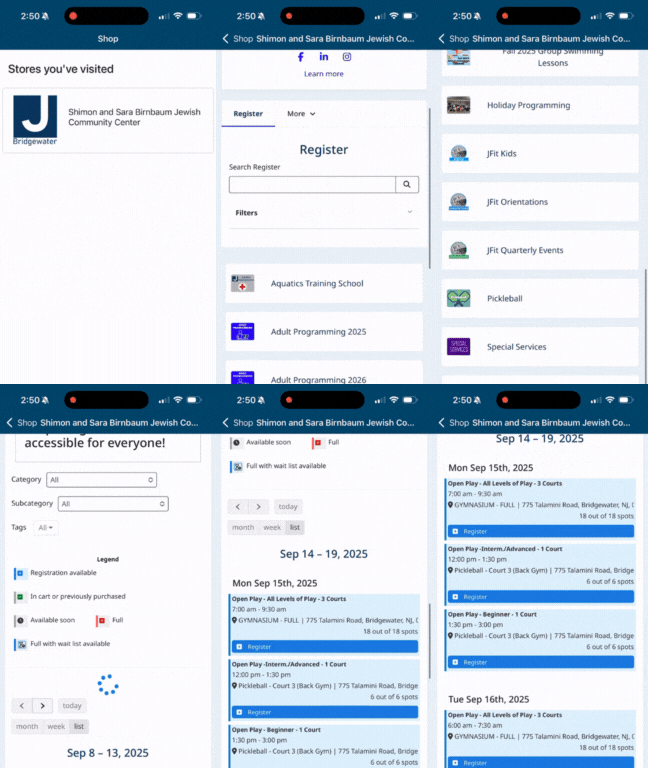
- Login to the Amilia App
- Click on the Shop button
- Select the Shimon & Sara Birnbaum JCC “Store”
- In the store, navigate to the Pickleball Program
- View the calendar - available Open Play Pickleball spots will appear in Blue.
- Make sure you are viewing the correct date.
- Click on a date and choose participants by clicking the + next to their names
- Continue shopping to select additional dates or proceed to checkout.
- JCC Basic, Star, JACTIVE+ & Pickleball Add-on members are the only members that have access to this activity.
- Success - - You are now Registered!
Cancel an Open Play Pickleball Reservation Using the Amilia App
- Login to the Amilia App
- Click on the Calendar icon
- Click on the Reservation date and slot that you wish to cancel
- Select Cancel this event
- You will see a “Success” notification pop up
- You will also receive an e-mail confirmation of the cancellation.
Reserving Open Play Pickleball via the Web Browser
Examples of Browsers: Safari, Chrome, Mozilla Firefox
- Login to your Amilia account using www.amilia.com from your browser.
- Select the Shimon & Sara Birnbaum JCC “Store”
- In the store, navigate to the Pickleball Program > Open Play Pickleball
- View the calendar - available Open Play Pickleball spots will appear in Blue
- Make sure you are viewing the correct date.
- Click on a date and choose participant(s) by clicking the + next to their name (s)
- Continue shopping and repeat step 5 to secure additional Open Play dates and then proceed to checkout.
- JCC Basic, Star, JACTIVE+ & Pickleball Add-on Level members are the only members that have access to this activity.
- Success - - You are now Registered!
Cancel an Open Play Pickleball Reservation Using via the Web Browser
- Login to Amilia using www.amilia.com from your browser
- Click on the date you have a reservation on your Account Calendar.
- You will see a Green ✅ check mark showing you are registered for that date.
- Click on the “Register” button
- Select “Unregister” next to your name
- You will see a “Successfully Unregistered” notification pop up
- You will also receive an e-mail confirmation of the cancellation.
Is you account already setup? Use this button to login in to Amilia.com
How our New Rolling 14-Day Reservation Process Works
Our new Amilia system allows you to make reservations up to 14 days in advance on a rolling basis. This means:
- Every day, a new day opens for booking.
- Starting, September 10, you can book classes or spots from September 15 through September 29.
- On September 11, you’ll then be able to book through September 30, and so on.
- The window always stays at 14 days. You won’t ever be able to book more than 14 days out, but you’ll always have that full 14-day range available.
- Reservations update daily. As one day passes, another day becomes available to book.
This “rolling” system ensures everyone has a fair chance to reserve their preferred times and that availability refreshes daily.
The Membership team will have a Help Desk at the Welcome Center on Tuesday, September 9, at 8:00 AM.
Super Bowl Membership Flash Sale

1 Day ONLY - Super Bowl Membership Flash Sale
Join the JCC on Monday, February 9, 2026, and your joiner Fee is only as big as the Super Bowl's winning team's score. (i.e. if the final score is 24-21, your joiner fee is just $24)